Vehicle and trip tracking
See the last location, today's route, vehicle status and alerts once the tracking provider is connected.
Arkova helps companies manage operations and accounting, with modules for construction and real estate development.
Configure modules to suit your business activities and workflows.
See the last location, today's route, vehicle status and alerts once the tracking provider is connected.
Record clock-ins and clock-outs with valid written consent. Arkova checks the geofence at the time of each entry.
Set up a company from the owner's platform using an industry template and selected modules. Each company has its own database, and users select their company by its code.
Manage requisitions, quotations, awards, purchase orders, goods receipts and invoice matching. Qualify suppliers and verify their bank accounts.
Manage material issue requests, transfers, inventory in transit, stock counts, production orders and batches. Compare actual and standard consumption.
Manage quotations, supply contracts, sales orders, delivery and invoicing. Track credit, collections and customer returns.
Generate tax documents locally in the required format, with a hash chain and QR code. Returns generate a linked credit note. Submission to ZATCA is enabled after production certification and a decision to connect.
Manage journal entries, the general ledger, period close, receipt and payment vouchers, and receipt allocations. Import bank statements in the configured format for reconciliation.
Monitor budgets, exceptions, financial reports, branch profitability and VAT. Break-even analysis uses fixed and variable cost classifications.
Manage employee records, attendance, leave, personnel decisions, payroll and end-of-service benefits. Export files for upload to Qiwa and GOSI, and WPS files for upload to Mudad.
Manage vehicle records, driver licences, trips, fuel reports, incidents, work orders and preventive maintenance.
Manage asset records, depreciation, counts, transfers and disposals, construction in progress, leases and impairment.
Manage projects, units, pricing, reservations, contracts, instalments, contractors, progress claims, handover and after-sales work.
Assign separate roles for preparation, review, approval and execution. Use change requests for significant changes and track actions in the audit log.
Detect and assign cases. For selected cases, agents prepare a draft. The case owner creates the document from the draft, and the authorised approver approves it.
The mobile app connects securely to the company server so users can view metrics and track tasks according to their permissions. See field attendance for sales representatives.
Two screenshots from Arkova with training data. Select either image to view it at full size.
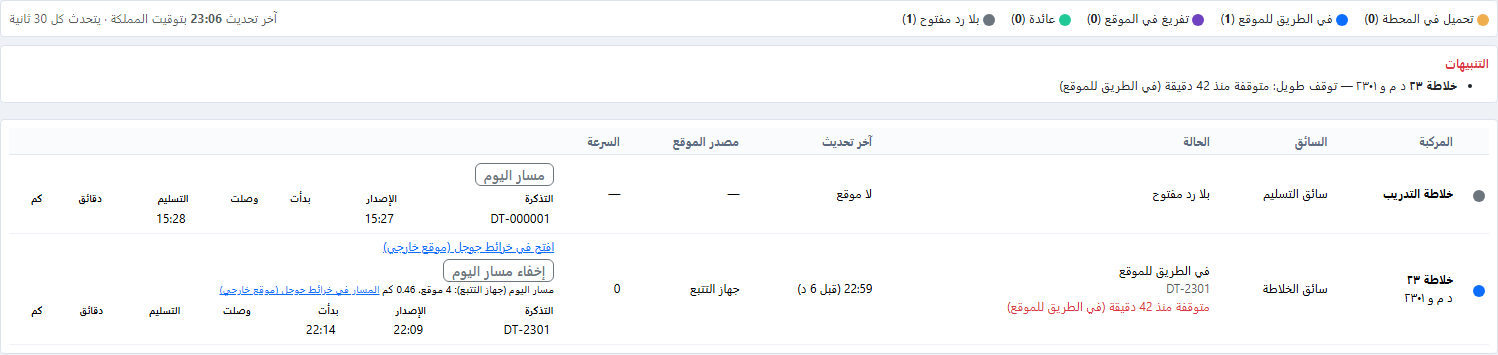
See the mixer truck status from today's ticket and its stop alert. Open the route to see the number of tracking points and the distance.

The screenshot shows a clock-in inside the geofence and one outside it, with the time and location accuracy of each.
An agent detects a case and assigns it to the person responsible. At Level 2, for selected cases it prepares details for a requisition, collection letter or accrual entry, and attaches them to the case as a draft.
The case owner reviews the draft and creates the document as its preparer. An authorised approver approves it according to the workflow and its separation of duties. The agent detects cases and prepares drafts.
Arkova exports the files. The responsible user uploads them to each platform and follows up there.
Location comes from the vehicle's tracker via the company's tracking provider. The system retains tracking points and timestamps for the configured period. After that, the location is removed from view, the points are deleted, and the audit log records the deletion event. The ticket retains the response start and arrival times and, where measured, the total distance.
Location and its accuracy are saved with the clock-in or clock-out time and the geofence result. Arkova captures location only at clock-in or clock-out on working days with valid written consent. HR and the line manager can view it according to their permissions. The representative can withdraw consent in writing and return to standard clock-ins and clock-outs.
Leave your contact details and tell us which modules interest you so we can follow up about a quote.
Email for quote requests Info@asasaljadwa.com